Control Flow
Introduction
In life, you make many decisions, like what to eat, what to wear, these smaller choices dictates the direction of your life. Similarly, when creating applications, your code will also face many decision , and these smaller choices will dictate the direction your code. This change in direction in which your code moves can be termed as flow of your code. I
In further section, you will learn what is control flow, some real life examples, how do you make decision in your code that dictates the direction of your code. What are different ways to do it and some gotchas.
What is control flow?
According to Wikipedia, control flow (or flow of control) describes how execution progresses from one command to the next. A code is just bunch of instructions, normally these instructions are executed sequentially, but when your code have to make a decision and then you take a choice, control flow describes you, where to find the next instruction, after executing the first instruction.
Simply, control flow gives path to your code after you take a decision in your code. Control flows are represented with a control flow diagram. Let us take a example, where you are hired by government to develop a software, that allows or denies citizens to vote based on their age.
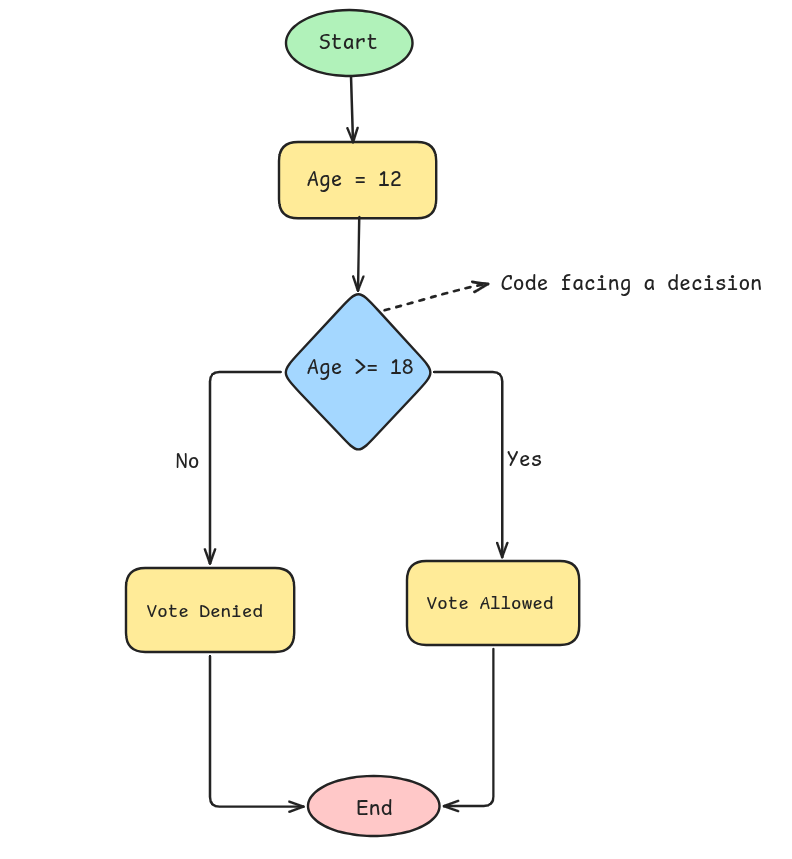
When the above code is presented with a decision, it has two path, either allow the citizen to vote or deny it.
Control flow tells us what to do after a choice is made. Suppose your code made the choice based on some criteria i.e. age (12) to decided to not allow the person to vote.
Control flow will tell the code to follow the no path where vote is denied. Similarly, criteria satisfies and your code decided to allow it, control flow will tell the code to follow the yes path.
Control flow statements
When developing complex application or a small application handling lot of scenarios, your code will be presented with many decision, and to control the flow of your code you will use control flow statement to create different path that your code will take after making a choice.
The most important thing in control flow statements is criteria. Based on these criteria either satisfying or not satisfying control flow statements are handled.
Mainly there are 3 type of statements :-
If else statement
Else if statement
Switch statement
In later section, you will learn about these statement types in depth with real world examples, when to use each statement type, what are the difference between each statement type and some gotchas
If Else Statement
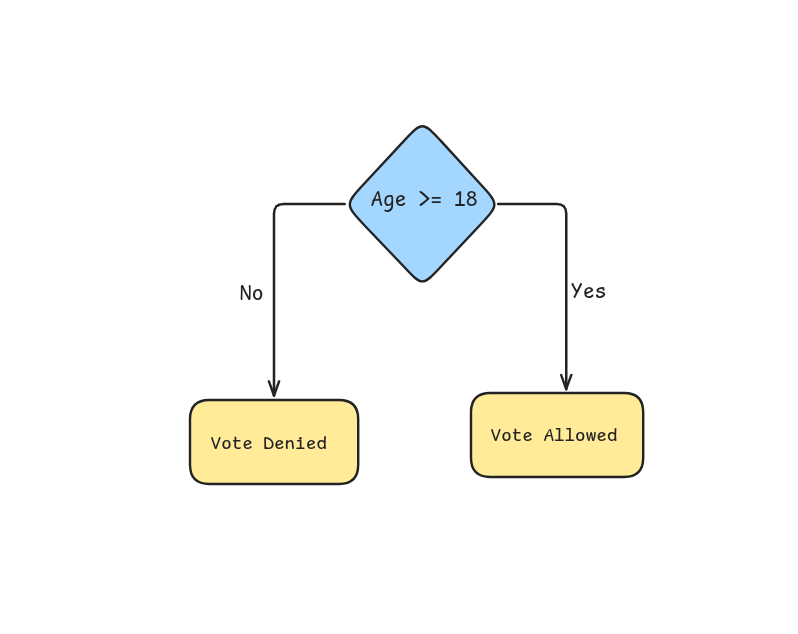
These statement types are used when you have to make decision having only two choices, like the above example, where you were developing an application which either allowed to vote or denied to vote. In this example, you have two choices.
// General structure

if(some_criteria) {
    // perform operation after some_criteria is satisfied
} else {
    // perform operations after some_criteria is not satisfied
}

// The above voting example
if(age >= 18) {
    console.log("You are allowed to vote");
} else {
    console.log("You are not an adult, denied to vote");
}
In the if block, you write the instruction / code that you want to execute after the condition is satisfied. Like in the above example, age greater than or equal to 18 is the condition, if the condition satisfies, your code will print the line You are allowed to vote, else your code will print the line You are not an adult, denied to vote.
Else if statement
In you have to make a decision having only two choices, then you can use if else statement. However, in decision having more than two choices. You have to write nested if else statement to handle these conditions.
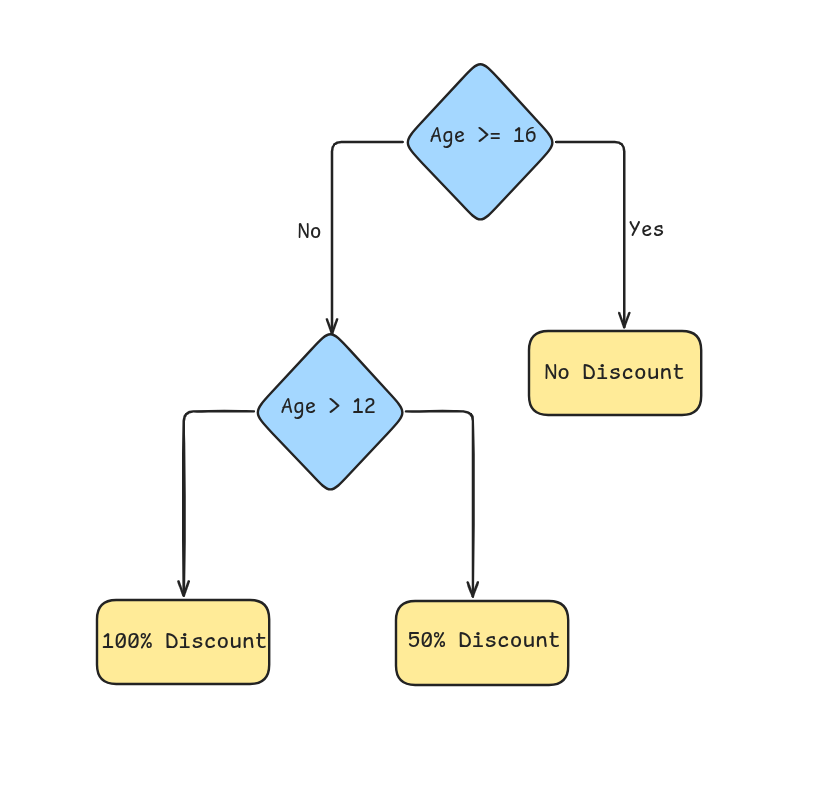
For example, You are hired by Ticketmaster or BookMyShow to develop a software which decide the ticket price based on the age of the person. For children age less than or equal 12, the ticket price is zero, children aged more than 12 but less than 16, the ticket price is half, and for age above or equal to 16 the ticket price is full.
const BASE_FEE = 1000;

if(age >= 16) {
    console.log("Ticket price is " + BASE_FEE)
} else {
    if(age > 12) {
        console.log("Ticket price is " + BASE_FEE / 2)
    } else {
        console.log("Ticket price is " + 0)
    }
}
In the above example, you had three choices to make. You used if else statement in nested manner in which you first check if the person is aged greater or equal to 16 or not. Then if the person is not greater or 16, you created another if else statement to check if the person is greater than 12 or not. Then, if that is also not satisfied then the person is less than or equal to 12.
To handle 3 choices you had to write these ugly nested if else statements. How about 4 choices, 5 choices or 10 choices. It will be difficult to read and understand the code by your peers, resulting you getting fired on day one.
There is another statement type that is used with if else statement when the choices are more than 2, which is the else if statement
// General structure

if(first_criteria) {
    // perform operation after first_criteria is satisfied
} else if(second_criteria) {
    // perform operation after first_criteria is not satisfied and second
   // criteria is satisfied
} else {
    // perform operation when both the criteria is not satisfied
}


const BASE_FEE = 1000;

if(age >= 16) {
    console.log("Ticket price is " + BASE_FEE)
} else if(age > 12 ) {
    console.log("Ticket price is " + BASE_FEE / 2)
} else {
    console.log("Ticket price is " + 0)
}
This is more readable and can be easily understood by your peers, resulting you getting promotion on day one.
Difference between else if and multiple if if statements
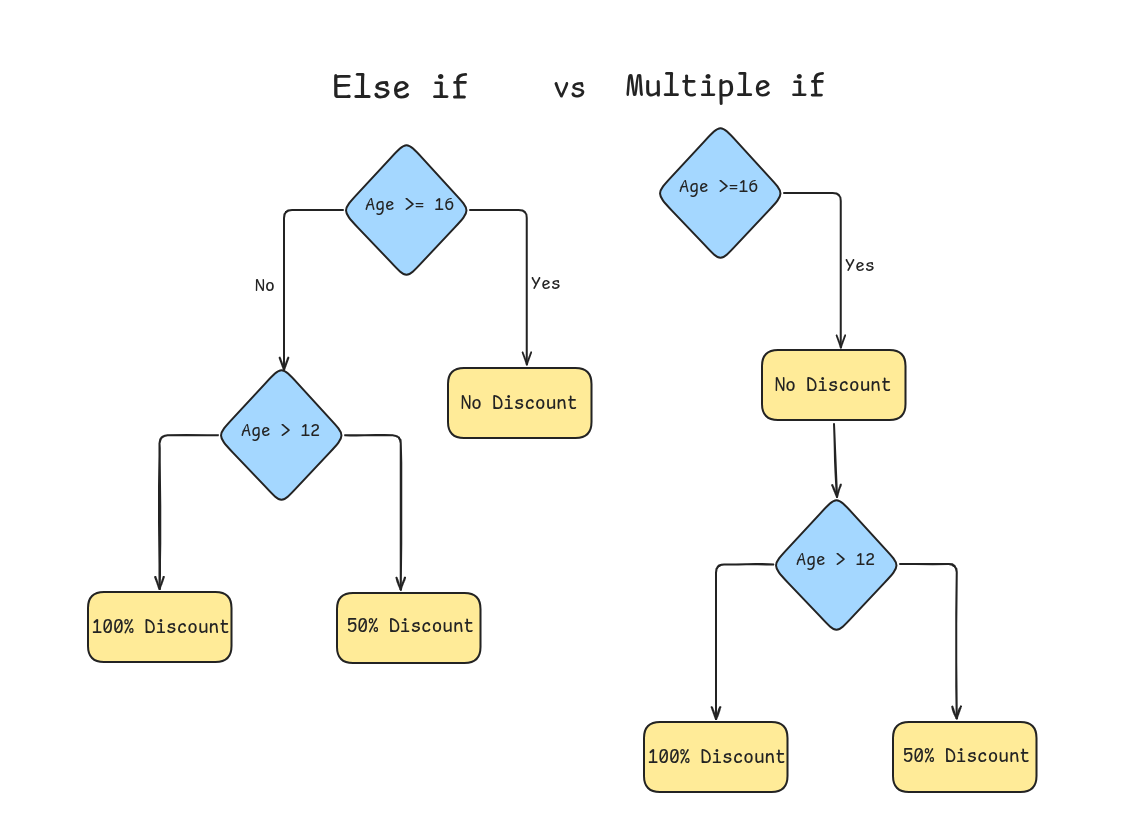
There might be some confusion, that why do you have to create a nested if else statement to handle these scenario. One may handle this solve in this way :-
const BASE_FEE = 1000;

if(age >= 16) {
    console.log("Ticket price is " + BASE_FEE)
} if(age > 12 ) {
    console.log("Ticket price is " + BASE_FEE / 2)
} else {
    console.log("Ticket price is " + 0)
}
No nested if else structure, easy to read right? But there is logical issues in the code. You will get both Ticket price is 1000 and Ticket price is 500 if you are above or equal to 16 .
Let's go through the code step by step, assume that the given age is 18
if (age >= 16) :- In this part, you are checking if the age is greater than or equal to 16 or not, you are given 18 as age input. So this satisfies the code and print the line
Ticket price is 1000if (age > 12) :- In this part, you are checking if the age is greater than 12 or not, this also satisfies the criteria and hence printing the line
Ticket is 500.Here is the error, you wanted to implement the logic as if you had 3 choices, and action correlated to each choice is independent. Simply meaning, for each choice you will only perform the action related to that choice only and not other even if the condition is satisfied. In the first example, the else block that is omitted in this example was prevent other action to be performed even if the criteria is satisfied.
Switch Statement
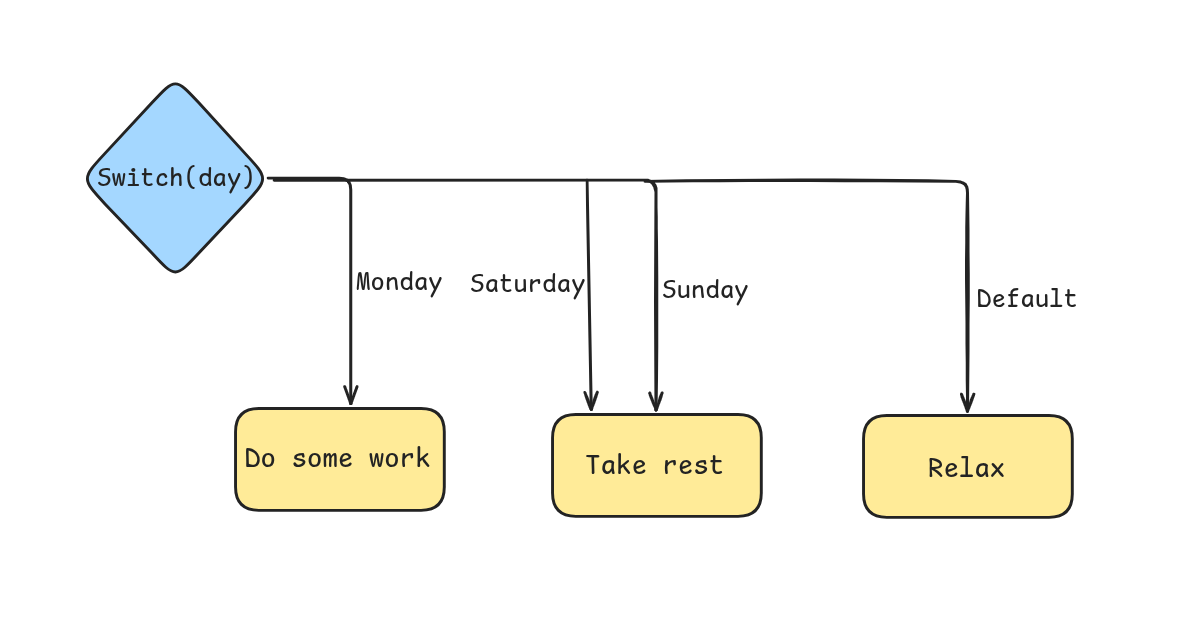
There is another control statement type that is used when you have more than two choices. But there is a slight difference between else if statements and switch statements. Switch statements are used when there is when you are comparing one value with many different specific cases. Else if statements are used when there are multiple conditions. Remember that you can also use else if statement to handle these scenarios, but using switch statement are cleaner and easy to understand.
Here is a situation, where switch statement shines. Suppose you are creating a time table app for your daily life, where you based on the day, you print some do some work.
// General structure
switch(data) {
    case first_case : // perform task due to first_case
    break;
    case second_case : // perform task due to third_case
    case third_case : // perform task due to third case
    break;
    default: // perform task when no match found
}


switch(day) {
  case "Monday":
    // do work
    break;
  case "Saturday":
  case "Sunday":
    // take a rest;
    break;
  default:
    // relax;
}
In the above example, you can see that when the day is Monday , you do some work, In case of Saturday or Sunday , you take rest for the day. And for other days signified by default , you relax for the day.
Here you can see break, the break statement break the control flow and exits out of the switch block. In case there is no break statement, it will also execute the action below it similar to the multiple if statement. You can see in the cases of Saturday and Sunday both of them are doing same action because there in break statement between them.
Conclusion
You learned what is control flow, some examples related to control flow, how to implement control flow in your code with the help of different control flow statement types. Difference between each control flow statement type and when to use each control flow statement type. An important difference between else if statement and multiple if statements.